Xbox Cloud Gaming Limits Explained – 5, 10 and 15 Included Hours from November
Xbox Cloud Gaming is moving to monthly included hours in November: 15 for Ultimate, 10 for Premium and 5 for Essential. Here’s what changes and what is still unknown.
Xbox Cloud Gaming is changing in November 2026, with Game Pass plans moving from effectively unlimited eligible cloud play to a set number of included cloud gaming hours each month.
Microsoft has confirmed three monthly allowances:
- Game Pass Ultimate: 15 cloud gaming hours
- Game Pass Premium: 10 cloud gaming hours
- Game Pass Essential: 5 cloud gaming hours
Players who use all of their included time will be able to purchase additional cloud playtime through the Xbox Store. Microsoft is also introducing a separate option for people who do not subscribe to Game Pass at all, allowing them to buy cloud hours and stream eligible games they own.
This guide explains what has been confirmed, what remains unknown and how the November changes affect different ways of playing.
Xbox Cloud Gaming limits at a glance
| Game Pass plan | Included cloud gaming time per month |
| --- | ---: |
| Game Pass Ultimate | 15 hours |
| Game Pass Premium | 10 hours |
| Game Pass Essential | 5 hours |
These limits relate specifically to Xbox Cloud Gaming.
Microsoft's official cloud gaming changes announcement says eligible Game Pass subscribers currently use cloud gaming without these monthly hour caps, with the new model beginning in November.
When do the new limits begin?
The new cloud-hour system begins in November 2026.
Microsoft has not yet provided an exact start date within the month.
The company says it will share more information in November about pricing, additional-hour packages, eligible games, market availability and how players can check remaining cloud time.
That means some practical details are still deliberately being held back until closer to rollout.
Ultimate includes 15 hours per month
Game Pass Ultimate will include 15 hours of cloud gaming each month.
Ultimate remains the tier with the largest included allowance, but players who use cloud gaming as their primary way to play may notice the change much more than people who only stream occasionally.
For someone who mainly plays installed games on console or PC and uses cloud gaming to sample titles, continue a game away from home or play on another device occasionally, 15 hours may cover much of their normal use.
For someone who regularly spends entire evenings playing through the cloud, the allowance can disappear considerably faster.
Premium includes 10 hours
Game Pass Premium will include 10 hours of cloud playtime per month.
The same principle applies: cloud gaming remains included with the subscription, but it becomes a metered part of the plan rather than an open-ended benefit.
Once the included time is exhausted, Microsoft says additional cloud hours can be purchased.
Essential includes 5 hours
Game Pass Essential will include 5 hours per month.
That makes it more suitable for occasional cloud use than treating streaming as a primary gaming platform.
The lower allowance could still be useful for quickly accessing a supported game on another device, testing a title before installing it locally or playing when your main console is unavailable.
What happens when you run out of cloud hours?
Microsoft says subscribers will be able to purchase additional cloud playtime through the Xbox Store.
The exact prices have not yet been announced.
Xbox has also not confirmed how many hours will be sold in each package or whether purchasing options will be identical in every market.
This is an important point: the November change is not a hard lock that permanently stops cloud access once the included allowance is gone.
Instead, the included subscription hours end and additional time becomes a separate purchase.
How much will extra Xbox Cloud Gaming time cost?
As of October 3, 2026, Microsoft has not announced the pricing.
Any specific price circulating before Xbox confirms it should therefore be treated cautiously.
Microsoft says available hours, purchasing options and cloud features may vary by market, with further information promised before or during the November rollout.
We will update this guide once UK pricing and package sizes are confirmed.
You will be able to use Xbox Cloud Gaming without Game Pass
November also brings a major change for non-subscribers.
Microsoft says players will be able to purchase cloud playtime directly from the Xbox Store without having a Game Pass subscription.
Those purchased hours can then be used to stream eligible games the player owns on supported devices.
This makes cloud gaming more of a standalone Xbox service rather than a feature that always requires an ongoing Game Pass membership.
You still need to own an eligible game when using the non-subscription option
Buying cloud hours does not mean buying the game itself.
Microsoft says the no-subscription model applies to eligible games you own.
So there are two separate pieces:
- ownership or entitlement to the supported game;
- cloud playtime allowing you to stream it.
A player who already owns a large digital Xbox library may therefore be able to pay only for cloud time when they need remote access rather than maintaining a Game Pass subscription throughout the year.
Which devices support Xbox Cloud Gaming?
Xbox Cloud Gaming is available across a wide range of supported hardware.
Microsoft's Xbox Cloud Gaming page currently highlights support across devices including:
- Windows PCs;
- Xbox consoles;
- supported phones and tablets;
- selected Samsung and LG smart TVs;
- Amazon Fire TV devices;
- selected Meta Quest headsets;
- and supported handheld gaming devices.
Exact availability varies by device, game and region.
A compatible controller or supported input method may also be required depending on the game and hardware.
Does playing an installed game use your cloud hours?
Microsoft's announcement specifically describes the new allowance as cloud gaming hours.
Playing a game that is installed locally on your Xbox console or PC is a different method of running the game and is not described as part of the cloud quota.
In practical terms, the new limit is aimed at time spent streaming games from Xbox's cloud infrastructure.
If you have sufficient storage and hardware available, installing games locally will therefore remain the obvious way to avoid using cloud playtime unnecessarily.
A useful strategy: use cloud gaming before a large download
One of the best uses of cloud gaming has always been quickly trying a supported game without waiting for a large installation.
That becomes even more relevant once hours are limited.
Instead of using cloud gaming for an entire long campaign, a player could stream the opening portion, decide whether the game is worth keeping and then install it locally for the rest.
That preserves cloud time for situations where streaming provides a genuine advantage.
Save cloud hours for devices where local installation is impossible
Cloud gaming is most valuable when it gives access somewhere the game cannot simply be installed.
Examples include:
- a supported smart TV;
- a phone or tablet;
- a lightweight device away from your main system;
- or an older Xbox using cloud access for an eligible newer title.
If you have both local and cloud options available, using the installed version at home and preserving cloud time for these situations will make the monthly allowance stretch further.
Xbox One players can still use cloud gaming for newer games
Microsoft specifically points out that cloud gaming can allow Xbox One owners to access eligible games built for Xbox Series X|S without immediately upgrading their console hardware.
That use case remains important under the new model.
The difference is that from November, the amount of included cloud time depends on the Game Pass tier.
Why is Microsoft introducing the limits?
Microsoft says the cost of providing cloud gaming increases as more people use it and play for longer.
The company says moving to monthly allowances will help it continue investing in cloud reliability and performance.
Microsoft also acknowledges that for some players the practical result will be a higher cost.
That is unusually direct wording and important context: this is not simply a renamed benefit. Heavy cloud users may need to purchase additional hours once their monthly allocation is exhausted.
How many Game Pass users will be affected?
Xbox says it expects the new limits to affect around 4% of Game Pass subscribers.
That figure suggests most subscribers currently use less cloud time than the new allowances or do not use cloud gaming regularly.
However, the effect will obviously be much larger for the smaller group of players who rely on cloud streaming as their main way to play.
Will unused hours roll over?
Microsoft has not announced whether unused included cloud hours can roll into the following month.
Until Xbox publishes the full November terms, players should not assume unused time will accumulate.
The safest interpretation is simply that each Game Pass plan comes with a stated monthly allowance, with more detailed rules still to be confirmed.
Can you see how many hours you have left?
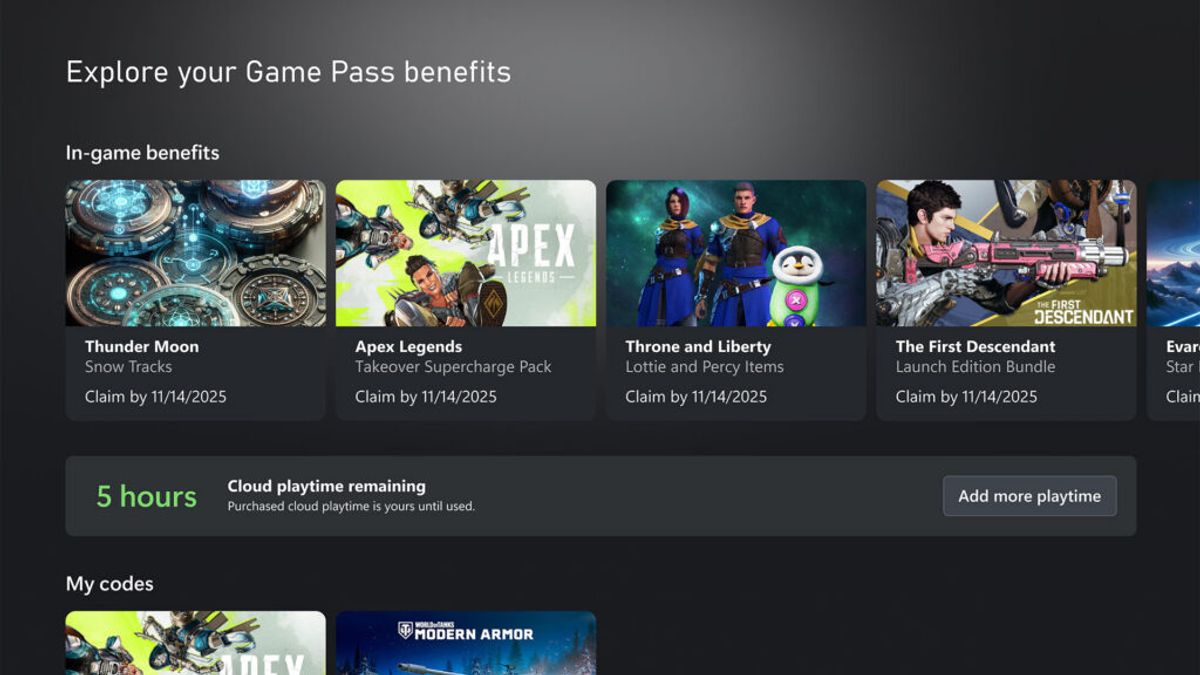
Microsoft says more information is coming about how players can check their remaining time.
The announcement imagery already shows an example of a cloud playtime remaining display, but the final interface and where it appears across devices have not been fully detailed.
![image]()
A clear remaining-hours indicator will be essential once usage begins affecting whether another purchase is required.
What is still unknown before November?
Several important details remain unconfirmed:
- the price of additional cloud hours;
- the sizes of purchasable hour packages;
- exact market availability;
- whether unused included hours roll over;
- the complete list of games eligible for the non-subscription model;
- and the precise user interface for tracking remaining time.
Microsoft has promised more information in November.
How to prepare for the change
If you currently use Xbox Cloud Gaming frequently, the most useful thing to do is understand what kind of cloud player you are.
Occasional users may find that nothing meaningful changes in day-to-day use.
Frequent streamers may want to start separating the games that really benefit from cloud access from those that could easily be installed locally.
A sensible approach is:
- install longer games on console or PC where possible;
- use cloud streaming to sample games before committing to a download;
- save cloud hours for travel and secondary devices;
- and wait for official extra-hour pricing before deciding whether a different Game Pass tier offers better value.
The bottom line
From November 2026, Xbox Cloud Gaming becomes a metered benefit inside Game Pass.
Ultimate includes 15 hours per month, Premium includes 10 and Essential includes 5. Additional hours will be sold through the Xbox Store.
At the same time, Xbox is opening cloud gaming to another group of players by allowing people without Game Pass to buy cloud time and stream eligible games they already own.
The biggest unanswered question is price. Until Microsoft reveals the cost of additional hours, it is impossible to calculate the full impact on heavy cloud users.
For occasional streaming, the included time may be enough. For players who use cloud gaming as their main platform, November's pricing announcement will be the detail that matters most.